https://www.cloudshark.org/collections/WTRpgLI-GQSDfgzkQixICg
Tuesday, August 30, 2022


Wednesday, May 04, 2022
OSPF LSDB formation (WIP)
Straight to the point... Let us learn how OSPF creates and maintains the same LSDB across all nodes in one area.
For that we need to look at all the route types. First let us see from OSPFv2 perspective.
These are some of the nice resources I could come across:
https://packetpushers.net/ospf-graphs-lsas-and-the-lsdb/
The approach is here is to read through the articles, ask self queries and try to make the understanding clear here.
The steps are pretty simple:
* From all the LSAs received a graph is created ( LSDB graph)
* The graph becomes input to the SPF algorithm which creates the best path OSPF routes.
Let us look at the various LSA types in OSPF and see how LSDB is formed. We will look at only the basic necessary fields to populate the LSDB.
Type 1: Router LSA.
It contains Link ID - which is the unique Router ID and can be used to identify the Router.
The Router LSA will also contain the links attached to the Router. It will have all the prefixes which the router has configured OSPF ( including the active and passive interfaces).
Each links will be processed separately in SPF calculations
TO CONTINUE:
Tuesday, May 06, 2008
Flow control in data link layer
Do we need flow control in datalink layer ?
May be we should have. The example given in switch book is like this: You may be travelling to watch a cricket match and the stadium has enough parking space.. but the road in btw is jammed due to traffic. So even if the parking space is there, it does not help us are we are stuck in traffic.
Similarly TCP has end-end flow control. But it does not detect link layer flow issues fast. Many techniques are used in ethernet for flow control.
In half duplex ethernet some of the techniques used are:
1. send jam signal in the link where u want to throttle the flow
2. or send preamble signal in the link where u want to throttle the flow
3. or start sending the packets before the interframe gap is finished ( so that ur output queue gets priority )
For full duplex ethernet, IEEE has designed MAC control frames - A PAUSE frame is send to start/stop flow.
The link layer techniques to control flow are handy. But it sometimes confuses the upper layer protocols. TCP may not detect the flow issues and will be sending packets.., if link layer flow controls are not there, TCP may detect flow control issues faster and can take remedial actions..
May be we should have. The example given in switch book is like this: You may be travelling to watch a cricket match and the stadium has enough parking space.. but the road in btw is jammed due to traffic. So even if the parking space is there, it does not help us are we are stuck in traffic.
Similarly TCP has end-end flow control. But it does not detect link layer flow issues fast. Many techniques are used in ethernet for flow control.
In half duplex ethernet some of the techniques used are:
1. send jam signal in the link where u want to throttle the flow
2. or send preamble signal in the link where u want to throttle the flow
3. or start sending the packets before the interframe gap is finished ( so that ur output queue gets priority )
For full duplex ethernet, IEEE has designed MAC control frames - A PAUSE frame is send to start/stop flow.
The link layer techniques to control flow are handy. But it sometimes confuses the upper layer protocols. TCP may not detect the flow issues and will be sending packets.., if link layer flow controls are not there, TCP may detect flow control issues faster and can take remedial actions..
Full duplex Ethernet - without CS, MA and CD
Always we used to ask in interviews.. what is the media access protocol in ethernet ? - we always needed the answer CSMA/CD ... CSMA/CD was and is ethernet...
But in full duplex ethernet ???
In full duplex ethernet there is no multiple access... Rx of Host is connected directly to Tx of Switch and vice versa... No multiple access ( no MA).
So no need for career sensing ( no CS )
No chances of collision... so loopback connection also not needed ( no CD)
So full duplex ethernet is half duplex ethernet without CSMA/CD... Only the frame formats and related stuff is retained.. and full duplex ethernet does not add anything more to the protocol. It just makes it simple...
But in full duplex ethernet ???
In full duplex ethernet there is no multiple access... Rx of Host is connected directly to Tx of Switch and vice versa... No multiple access ( no MA).
So no need for career sensing ( no CS )
No chances of collision... so loopback connection also not needed ( no CD)
So full duplex ethernet is half duplex ethernet without CSMA/CD... Only the frame formats and related stuff is retained.. and full duplex ethernet does not add anything more to the protocol. It just makes it simple...
Tuesday, April 22, 2008
WAN technologies
Going through the WAN technologies topics.....
Frame Relay
ISDN
T1/E1
PPP
ATM
etc etc.....
Will post interesting stuff as i learn through it.....
Frame Relay
ISDN
T1/E1
PPP
ATM
etc etc.....
Will post interesting stuff as i learn through it.....
Monday, April 14, 2008
Saturday, April 12, 2008
Switched Lan sniffing!!!!!!!
I wanted to sniff packets from all ports in a switch, and the first thing I tried to do was to attach a PC to one port and run a netywork analyser software like ethreal in it. Then suddenly I realized my blunder. Unlike shared lan, a port in a switch receives only the traffic destined for that port....!
So I was curious on how sniffing was done in switches and found these technologies:
1. Port Mirroring
2. Switch Mirroring
In Port Mirroring, you map one monitored port to another mirrored port. So the traffic in monitored port will get reflected in mirrored port and can be used for analysis by a network analyser.
In Switch Mirroring the traffic from all ( or the configured ones) can be reflected in the mirrored port. The mirrored port shuld hav greater bandwidth to handle, this, but this mode is useful as all traffic can be seen in the mirrored port.
Another solution would be for Switch to support RMON MIBs. These MIBs give necessary information about the data transfer statistics in switch.
So I was curious on how sniffing was done in switches and found these technologies:
1. Port Mirroring
2. Switch Mirroring
In Port Mirroring, you map one monitored port to another mirrored port. So the traffic in monitored port will get reflected in mirrored port and can be used for analysis by a network analyser.
In Switch Mirroring the traffic from all ( or the configured ones) can be reflected in the mirrored port. The mirrored port shuld hav greater bandwidth to handle, this, but this mode is useful as all traffic can be seen in the mirrored port.
Another solution would be for Switch to support RMON MIBs. These MIBs give necessary information about the data transfer statistics in switch.
Thursday, April 10, 2008
Magic Quadrant for Campus LANs report
Evaluation of Enterprise Switches: Report:
Cisco remains the leader in the Campus LAN Magic Quadrant; however, cracks are showing, and viable competitors, such as HP ProCurve and Foundry Networks, are rapidly increasing share.
- http://mediaproducts.gartner.com/reprints/hp/153760.html
Cisco remains the leader in the Campus LAN Magic Quadrant; however, cracks are showing, and viable competitors, such as HP ProCurve and Foundry Networks, are rapidly increasing share.
- http://mediaproducts.gartner.com/reprints/hp/153760.html
IETF Workgroups
Started following IETF workgroups, and became a member of DHC workgroup - http://www.ietf.org/html.charters/dhc-charter.html
Wednesday, March 19, 2008
DNS Configuration Option via DHCP - RFCs of interests
RFCs which are of interested to implement DNS configuration options through DHCP:
RFC2132 - DHCP Options and BOOTP Vendor Extensions
RFC3397 - Dynamic Host Configuration Protocol (DHCP) Domain Search Option
RFC3646 - DNS Configuration options for Dynamic Host Configuration Protocol for IPv6(DHCPv6)
RFC2131 - Dynamic Host Configuration Protocol
RFC3315 - Dynamic Host Configuration Protocol for IPv6 (DHCPv6)
RFC2132 - DHCP Options and BOOTP Vendor Extensions
RFC3397 - Dynamic Host Configuration Protocol (DHCP) Domain Search Option
RFC3646 - DNS Configuration options for Dynamic Host Configuration Protocol for IPv6(DHCPv6)
RFC2131 - Dynamic Host Configuration Protocol
RFC3315 - Dynamic Host Configuration Protocol for IPv6 (DHCPv6)
Restart blogging
Planning to restart blogging. Will note down things that I come across which are useful to me.
Friday, November 09, 2007
Reading...
Re)started reading "Writing Security Code". Seems a very useful book.
Also now become a regular vistor to www.securityfocus.com and have registered to the mailing lists like BugTraq.
Learning is still interesting....
Also now become a regular vistor to www.securityfocus.com and have registered to the mailing lists like BugTraq.
Learning is still interesting....
Friday, June 22, 2007
Tools
I should be familiar with tools more ---
Here is a nice way to get dhcp message dump using tcpdump tool
http://www.mavetju.org/unix/dhcpdump-man.php
Here is a nice way to get dhcp message dump using tcpdump tool
http://www.mavetju.org/unix/dhcpdump-man.php
Friday, March 02, 2007
Setupapi.log - very useful
To debug driver installations setupapi.log is very useful. Its present in WINNT folder.
If any probs in NDIS driver installations at site, i ask support engineers to increase loglevel of setupapi and request the logs. Its easy to narrow down the issue.
To increase loglevel of setupapi.log
1. If the HKEY_LOCAL_MACHINE\SOFTWARE\Microsoft\Windows\CurrentVersion\Setup registry subkey does not contain a LogLevel entry, create one as a new REG_DWORD value.
2. Set the value of the LogLevel entry to the 0x2000FFFF.
If any probs in NDIS driver installations at site, i ask support engineers to increase loglevel of setupapi and request the logs. Its easy to narrow down the issue.
To increase loglevel of setupapi.log
1. If the HKEY_LOCAL_MACHINE\SOFTWARE\Microsoft\Windows\CurrentVersion\Setup registry subkey does not contain a LogLevel entry, create one as a new REG_DWORD value.
2. Set the value of the LogLevel entry to the 0x2000FFFF.
Thursday, February 15, 2007
Adding certificate to "local computer"
I was trying to add certificate to local computer instead of user profile.. Found only after some investigation. Sharing the results.
1. Launch mmc.exe
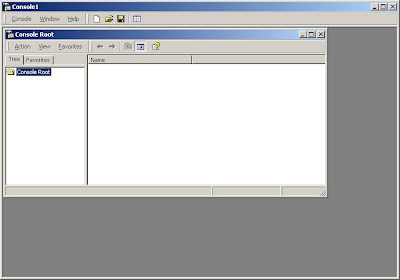 2. "Add Remove Snap-In" from Console
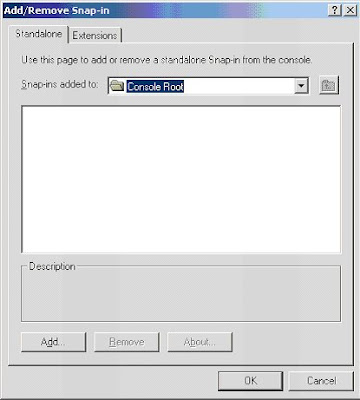 3. "Add"
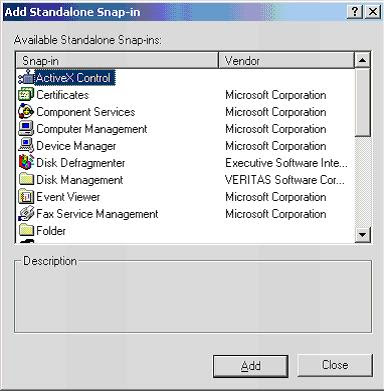 4. Select "certificates" and then "Computer account"
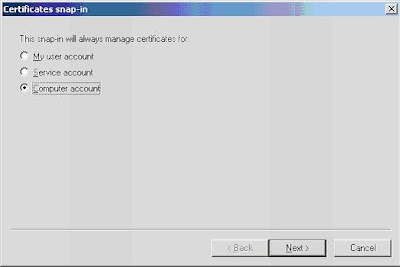 5. Finish
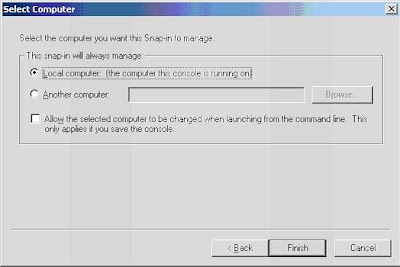 6. Managing certificates will be now possible!
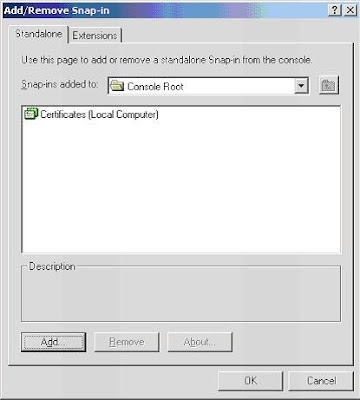
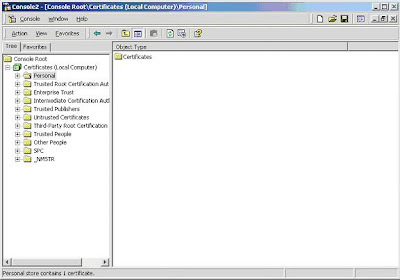 7. "import" certificates.
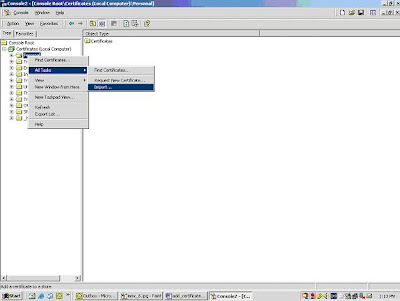 8. Wizard for installing certificate will be launched .., using that we will be able to select certificate and install

1. Launch mmc.exe
 2. "Add Remove Snap-In" from Console
 3. "Add"
 4. Select "certificates" and then "Computer account"
 5. Finish
 6. Managing certificates will be now possible!

 7. "import" certificates.
 8. Wizard for installing certificate will be launched .., using that we will be able to select certificate and install

Tuesday, February 13, 2007
Forrestor SSLVPN report
Analysis of the SSL VPN solutions available in the market - Report in pdf
Advantages of Nortel lies in:
1. Dual solutions - IPSec and SSLVPN in one box
2. Good clustering and fail-over capabilities
Advantages of Nortel lies in:
1. Dual solutions - IPSec and SSLVPN in one box
2. Good clustering and fail-over capabilities
Thursday, February 01, 2007
Select certificate
This article is a good reference - How To Select Client Certificate in WinInet
HTTPSendRequest will fail with error code - ERROR_INTERNET_CLIENT_AUTH_CERT_NEEDED (12044) if it needs a valid client certificate.
When the error comes: 1. Open the Microsoft certificate store - CertOpenSore
2. Find the certificate using - CertFindCertificateInStore() and get the CERT_CONTEXT
3. Use InternetSetOption with parameter - INTERNET_OPTION_CLIENT_CERT_CONTEXT. LPVOID). lpBuffer parameter should point to CERT_CONTEXT structure.
The KB article provided in the link was very much helpful to me.
HTTPSendRequest will fail with error code - ERROR_INTERNET_CLIENT_AUTH_CERT_NEEDED (12044) if it needs a valid client certificate.
When the error comes: 1. Open the Microsoft certificate store - CertOpenSore
2. Find the certificate using - CertFindCertificateInStore() and get the CERT_CONTEXT
3. Use InternetSetOption with parameter - INTERNET_OPTION_CLIENT_CERT_CONTEXT. LPVOID). lpBuffer parameter should point to CERT_CONTEXT structure.
The KB article provided in the link was very much helpful to me.
Tuesday, January 30, 2007
Multiple Stage Fragmentation
 Hi.., we had a discussion on how multiple stage fragmentation works..
First question was:1. where does the re-assembly of fragmented packets occur ?
Consider communication btw Device A and Device B. The IP Datagram is 12000bytes. The first link has a MTU 3300 bytes, the second link has MTU 1300 bytes and the third and final link has MTU 1300 bytes.
When the packet goes thru the first link it is fragmented to 3300 bytes, and the fragmented packets are again fragmented to 1300 bytes while passing through second link. Although the third link has MTU 3300 bytes, it is not assembled back. It is re-assembled only at the receiver Device B.
2. How does the re-assembly occurs at the receiving end ?
Every datagram whether fragmented or not is given an Identification number by the Source of the datagram - in this case Device A. This is a random number. The fragments of the datagram are identified using this number- as it is unique. Even if multiple fragmentation occurs this identification number does not change. So Device B can identify all fragments of a datagram using this.
Also where the fragments fit in is specified using "offset field" and not with an "index number". So the receiving end has no problem in assembling the packets.
Sunday, January 21, 2007
RSA SecurId - two factor authentication
Currently working on RSA SecurId Authentication.
RSA SecurId is a popular two factor authentication mechanism.
For successful authentication, not only you need what you KNOW ( say a PASSWORD), but also what you HAVE ( a SecurId device which generates TOKEN every 60s).
The TOKEN is generated by Device and also RSA Server from the TIME and also the SEED ( say a Unique number for that Device Serial Number)
RSA SecurId is a popular two factor authentication mechanism.
For successful authentication, not only you need what you KNOW ( say a PASSWORD), but also what you HAVE ( a SecurId device which generates TOKEN every 60s).
The TOKEN is generated by Device and also RSA Server from the TIME and also the SEED ( say a Unique number for that Device Serial Number)
Monday, January 01, 2007
Why SOCKS?
This link "Why SOCKS?" has the answer>
Just wanted to comment on the "Application-independent proxy" aspect. Once SOCKS client gets authenticated with SOCKS Proxy Server, and communication channel is established it can relay any Application data type. No extra code is required.
This is because SOCKS client works between Application layer and Transport layer, and it does not do anything which is application specific. Based on the encryption and encapsulation techniques selected, it will encode the data and send accordingly!
Just wanted to comment on the "Application-independent proxy" aspect. Once SOCKS client gets authenticated with SOCKS Proxy Server, and communication channel is established it can relay any Application data type. No extra code is required.
This is because SOCKS client works between Application layer and Transport layer, and it does not do anything which is application specific. Based on the encryption and encapsulation techniques selected, it will encode the data and send accordingly!
Subscribe to:
Posts (Atom)
About Me

- Anoop G
- Predictably Unpredicatble, lazy, careless, sincere, honest, caring, Trouble maker, emotional, likeable